





Online Payments Setup How-To Guide

How To Set Up Online Payments from soundcu.com
These step-by-step instructions will walk you through how to set up online payments from soundcu.com.
- Start from this website, soundcu.com
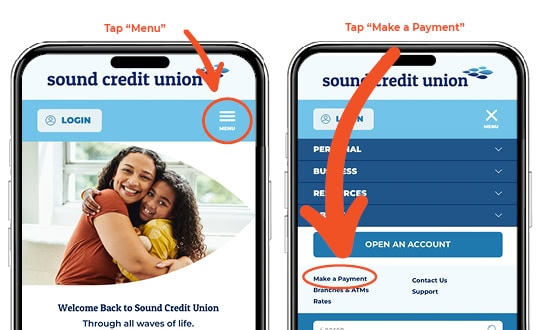
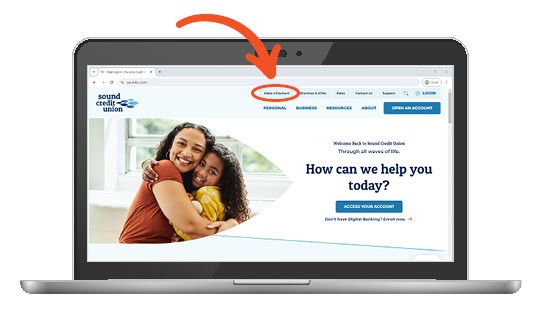
- If on a computer, select Make a Payment from the top utility menu. If on a mobile/tablet device, Select the menu button (three horizontal bars), then select “Make a Payment”.
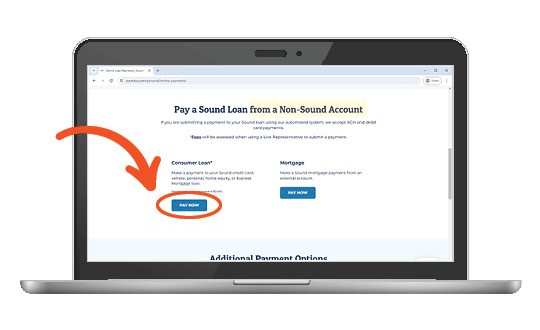
3. Scroll down and you will see “Pay a Sound Loan from a Non-Sound Account.” Select the Pay Now button beneath Consumer Loan*.
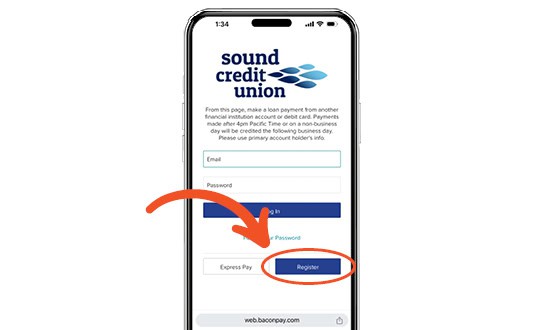
4. Even if you have a Sound Credit Union Online Banking account, select Register.
5. Enter the Primary’s information.
6. In the Primary Member Number field enter your Sound Credit Union identifying member number.
7. Enter the rest of the information and complete any additional steps until it prompts for a password.
8. Enter a password and from there you will be able to set up auto-pay or one-time payments.
Still Need Assistance?
Live Chat with us if you have further questions or concerns, we’re here to help. Or, contact us in the way that’s easiest for you.
You may also like…

Protecting Your Business: Cybersecurity Checklist
Your business works hard. Make sure your cybersecurity does too.

Loan Payments & Transfer Options
Sound Credit Union is committed to providing our members with a plethora of secure and convenient payment methods tailored to their preferences

Skipper, Our Digital Assistant
If you’re a frequent caller, you’ll notice a change to the phone menu. When greeted by Skipper, all you need to do is ask your question and it will be answered.